Frequently Asked Questions
Why don't I see all processing options?
The Process type list in the Data Processing panel is not a fixed menu. The Viewer rebuilds it for each dataset, and lists only the processors that the loaded dataset can actually feed. An option that is absent is an option that has no valid input in the current data.
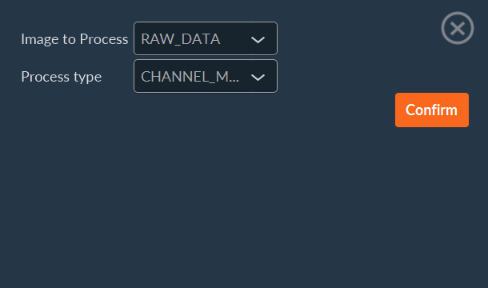
Three conditions govern the list.
The dimension must be present, and must hold more than one image
Every projection and combination processor consumes one dimension, and requires at least two images along it. A dataset with a single time point offers no time projection, and a dataset acquired on one focus plane offers no Z-stack projection.
| Process type | Condition on the dataset |
|---|---|
Time Average, Time Max, Time Standard Deviation |
The time dimension is used, and holds more than one image. |
Focus Average, Focus Max, Focus Standard Deviation |
The Z-stack dimension is used, and holds more than one focus plane. |
Channel Multicolor |
The channel dimension is used, and holds more than one channel. |
Stitching |
The dataset declares a tiling (mosaic) acquisition. |
Phasor Plot Split |
Always listed. |
Chart-derived processors appear in addition to this list, and only for the quantitative charts the dataset actually contains.
Stitching requires a tiling acquisition, not merely adjacent images
Stitching appears only when the loaded project declares a tiling acquisition. That declaration carries the tile grid and the stage coordinates of each tile, which the registration step requires. The Viewer does not infer a grid from image content, from file names, or from an arbitrary series of positions.
A dataset opened with Open Image, that is, opened as a TIFF file rather than as a project, never offers Stitching, even when the file contains every tile of a mosaic.
Note
To stitch a mosaic acquisition, open the project through Open > Open Project, and select its .cbf file. Do not open the individual TIFF files of the images directory.
Licensed options are read from the Inscoper hardware
A small number of processors are add-ons, and their availability is read from the license held by the Inscoper hardware. On a standalone workstation, with no hardware reachable, these processors are treated as unlicensed, and are omitted. Tiling, ratiometric, PCO FLIM, Jetraw, Microvolution, RIM, and SPARQ processing all fall in this category.
Diagnostic sequence
If an expected processor is missing, check the following, in order:
- Confirm that the dataset was opened as a project, not as a single TIFF file. Compare the dimension filters displayed in the Visualization tab against the dimensions of the acquisition.
- Confirm that the dimension the processor consumes holds more than one image.
- Confirm that the correct sequence is selected in the Image to Process list. The list is rebuilt for the selected sequence, and sequences of one project may differ in the dimensions they use.
- For a licensed add-on, confirm the license on the acquisition workstation.
How far does TIFF compatibility extend?
The Viewer reads the pixels of a broad range of TIFF files, but recovers the dimensions of a dataset only from Inscoper metadata. The distinction matters, because the dimensions govern navigation, filtering, and the processing list described above.
Pixels
Open Image reads TIFF and BigTIFF files, in the following formats:
- 8-bit and 16-bit grayscale, 32-bit integer grayscale, and 32-bit and 64-bit floating-point grayscale.
- 24-bit and 48-bit RGB.
- Uncompressed data, Deflate (zlib) compressed data, and Jetraw compressed data.
Outside this range, the file opens without displaying usable images. In particular, LZW, PackBits, and JPEG compressed TIFF files are not decoded, and files that split a single image across several strips or tiles are not reassembled.
Dimensions
The Viewer places each image in the dataset (channel, Z, time, and position) from the per-image metadata that Inscoper I.S. writes. Two cases arise.
The file carries Inscoper metadata. Every dimension is recovered. Channels, Z-stack, time, and positions are navigable, and the full processing list is offered. This applies to TIFF files written by Inscoper I.S., including stacks exported from the Viewer itself.
The file does not. Dimensions are not recovered. Each page of the file is presented as one time point of a single-channel time series. This is the case for TIFF files written by third-party software, whatever internal metadata they carry: OME-XML is not read, neither from the ImageDescription tag of an ome.tif file nor from a metadata.companion.ome file. Inscoper I.S. writes OME metadata for interoperability with Bio-Formats readers, and the Viewer itself does not consume it.
Without recovered dimensions:
- Only the time dimension is offered in the filters, so only the time projections appear in the Process type list.
- Channels, focus planes, and positions of the original acquisition are not separable, and appear as consecutive time points.
Stitchingis unavailable, since no tiling declaration and no stage coordinates are present.- The metadata panel reports only what the TIFF tags provide, namely image width, image height, bit depth, and pixel type. Hardware and experimental parameters are absent.
Recommended practice
| Objective | Action |
|---|---|
| Review an Inscoper acquisition, with every dimension and processor available. | Open the project through Open > Open Project, and select its .cbf file. |
| Inspect the pixels of an isolated TIFF file, whatever its origin. | Open the file through Open > Open Image. Expect a single-channel time series unless the file was written by Inscoper I.S. |
| Reopen an exported result later, with its dimensions preserved. | Export it from the Viewer as a Stack. Exported stacks carry Inscoper metadata, and reopen with every dimension available. |
| Read a third-party dataset with its own dimensions. | Use a Bio-Formats based application. The Viewer does not convert foreign metadata. |