Software Autofocus
Use the Software Autofocus module to keep your sample in focus during the acquisition sequence. To calculate Z-axis corrections, the software captures autofocus evaluation frames on the fly. These frames are processed in memory and are not saved to the disk.
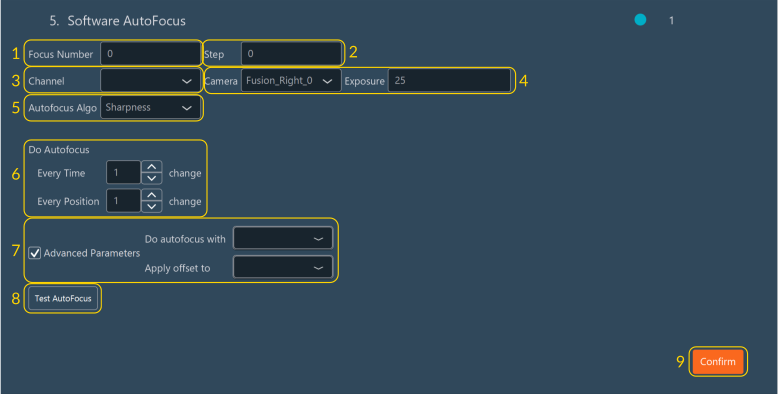
Configuring Software Autofocus
- Specify the number of Z-planes to acquire and analyze in the Focus Number field.
- Define the Z-axis step size in the Step field (in the units specified in the software settings) to determine the distance between successive planes.
- Select the active Channel used to evaluate focus.
- Select the active Camera and specify the sensor Exposure time (in ms) for the autofocus capture frames.
-
Select the autofocus algorithm from the Autofocus Algo dropdown menu:
-
Under Do Autofocus, specify the execution frequency of the autofocus routine. Enter the interval in the Every Time and Every Position fields to define how often the routine executes relative to time points and stage positions.
-
Select the Advanced Parameters checkbox to configure mechanical device integration:
- Under Do autofocus with, select the mechanical device that drives the autofocus routine (such as a fast piezo stage or the microscope internal Z-drive).
- Under Apply offset to (optional), select the mechanical device to which the system applies the calculated Z-offset.
-
Click Test AutoFocus to test the autofocus protocol on the sample immediately.
- Click Confirm to save the configuration.