Multi-Channels
Use the Multi-Channels dimension to configure one or more channels (e.g., fluorescence, brightfield) for the acquisition sequence. Channels must have been defined previously in the Configuration Tab.
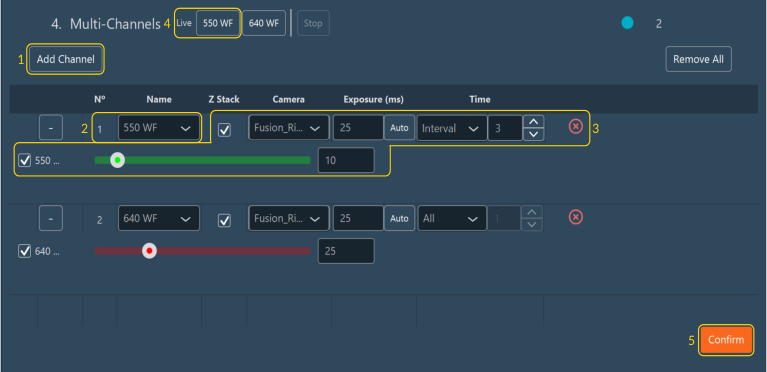
Configuring Channels
- Click Add Channel.
- Select a channel from the list.
-
Adjust the following parameters for each channel independently:
- Z-stack: Enables the Z-stack dimension specifically for this channel. If you uncheck this box, the center plane will be acquired.
- Z-Offset: Applies a spatial Z-offset. This is used when focal planes vary between emission wavelengths (chromatic aberration) or when targets are at different depths.
- Shutter Blink: Optimizes hardware shutter actuation to minimize sample exposure time and prevent photobleaching.
- Camera: Assigns the active camera (for multi-camera systems).
- Exposure (ms): Defines the sensor exposure time for the channel.
- Time: Defines the acquisition frequency within a time-lapse (e.g., acquire this channel at all time points, only the first time point, only the last time point, or at intervals).
- Intensity: Adjusts the excitation light source intensity (hardware-dependent, usually % power).
- Red cross: Delete a channel
-
To start a real-time preview of a channel, click the button corresponding to the channel's name (located next to the Live label in the multi-channel header). To apply any subsequent configuration changes, click the button again.
- Click Confirm to apply the configuration.
Note
If you change the exposure time or intensity during a live preview, click Live channel again to refresh the hardware and update the image stream.
Tip
Reorder the execution sequence of the channels by dragging and dropping them in the list.