Use the Nikon Ti2 Water Dispenser
The Water Immersion Dispenser (WID) of the Nikon Ti2 delivers water between a water-immersion objective and the sample, and removes it afterwards. Immersion water evaporates during imaging, so a long acquisition requires the water to be refreshed at regular intervals. This page explains how to fill the circuit, refresh it during an acquisition, and empty it at the end of the session.
Before you start
- The WID must be declared in the Configurator, as the Water dispenser module of the Nikon Ti2e. If its controls are missing from the Configuration tab, contact the instrument administrator.
- A water-immersion objective compatible with the WID must be mounted on the objective turret. The WID refuses to start with any other objective.
- Protect the objective, the sample, and the surrounding area from accidental water.
The WID controls
The WID controls are displayed in the NikonTi2 panel of the Configuration tab.
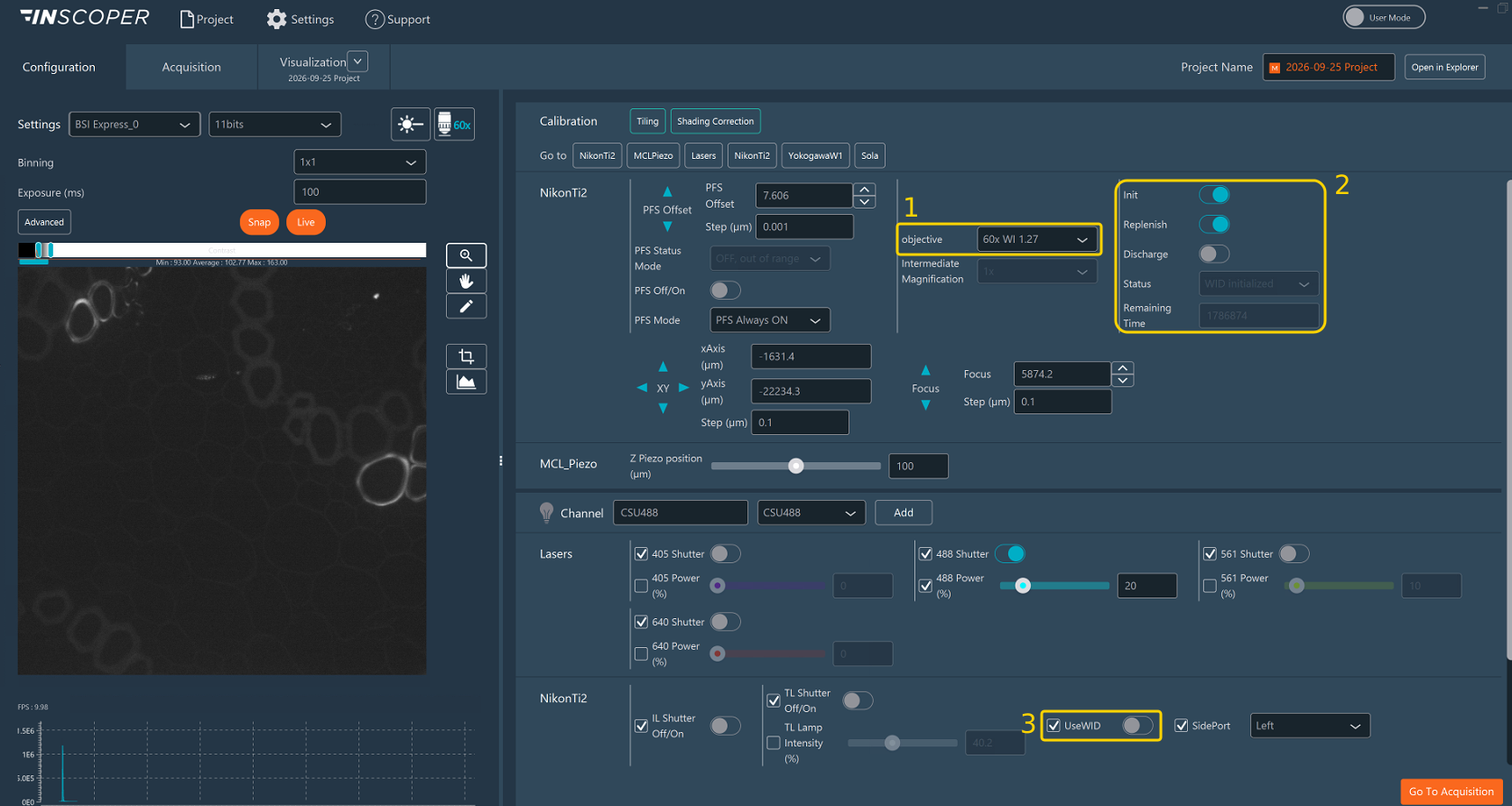
- objective: the objective in the light path, here
60x WI 1.27. - WID controls: the Init, Replenish, and Discharge switches, which start the three operations; the Status of the WID; and the Remaining Time before the next recommended refresh.
- UseWID: a virtual parameter that exists only to be saved in a channel. A channel with UseWID switched on refreshes the water each time the acquisition runs it.
A switch that cannot be used in the current state of the WID is disabled. This is a safety restriction, not a communication failure. The Reference section at the bottom of this page lists every control, status value, and duration.
Fill the circuit
- Select the water-immersion objective in objective (1).
- Stop any acquisition and any movement of the stage or of the focus.
- Switch Init (2) on.
- Wait until Status shows WID Initialized and Remaining Time starts counting down. Init stays on while the WID is initialized.
Pumping takes about 3 minutes. The objective then moves to a service position while the surplus water is removed, and returns to its focus position.
Do not start Init again while the WID is initialized. Use Replenish or Discharge instead.
Refresh the water
Switch Replenish (2) on. A refresh removes air bubbles, delivers fresh water, and removes the surplus. During the cycle, the objective leaves its focus position and returns to it at the end, so do not acquire images until Status shows WID Initialized again.
Remaining Time restarts at 30 minutes after each successful refresh. It is a reminder computed by Inscoper, not a measurement of the water left:
- When it reaches
0, no refresh starts automatically. The WID stays initialized until the next Replenish, whether started by hand or by the acquisition. - At
0, water can still remain on the objective. Refreshing every 30 minutes at most is the recommended default, but Inscoper I.S. does not enforce it: after checking the water on the objective, a longer interval, for example 45 minutes, can be used.
Refresh the water during an acquisition
Fill the circuit before starting the acquisition: an acquisition only refreshes a circuit that is already initialized. Then choose the approach from the duration of the acquisition, since one refresh is recommended for about 30 minutes of imaging:
| Duration of the acquisition | Approach |
|---|---|
| Shorter than 30 minutes | Switch Replenish (2) on, wait for WID Initialized, and start a single imaging sequence. |
| Longer than 30 minutes | Run a multi-sequence acquisition in which a dedicated sequence refreshes the water at regular intervals, as described below. |
Create the Water Dispenser channel
In the Configuration tab, create a channel dedicated to the water, as described in Creating and Loading Channels:
- Check the box beside UseWID (3), and switch the parameter on.
- Name the channel, for example
Water Dispenser. - Save the channel.
UseWID must be switched off in every imaging channel. An imaging channel with UseWID switched on would start a refresh, and move the objective, each time it is acquired.
Build the Water Dispenser sequence
In the Acquisition tab, add a sequence dedicated to the water, and name it, for example Sequence Water Dispenser.
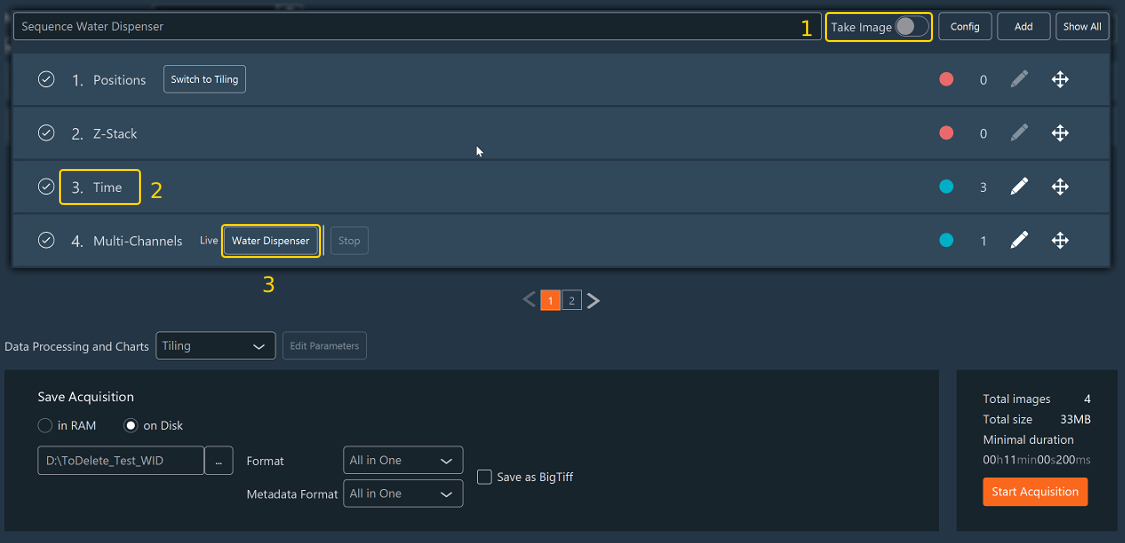
- Disable Take Image (1). The sequence refreshes the water and saves no image.
- Activate the Time (2) dimension. Its time points set when the water is refreshed.
- In the Multi-Channels dimension, select the Water Dispenser (3) channel as the only channel of the sequence.
Then open the Time dimension to set the refresh interval.

- Enter the Number of Time Points (1), which is the number of refreshes.
- Enter the Interval (2) between two refreshes. An interval shorter than 30 minutes keeps Remaining Time above
0; a longer interval is accepted, as described in Refresh the water. - Click Confirm (3).
The figure shows a 12-hour experiment: 29 refreshes, 25 minutes apart, for a Total Time of 12 h 5 min. Choose the number of time points so that the refreshes cover the whole duration of the imaging sequence.
Run it with the imaging sequence
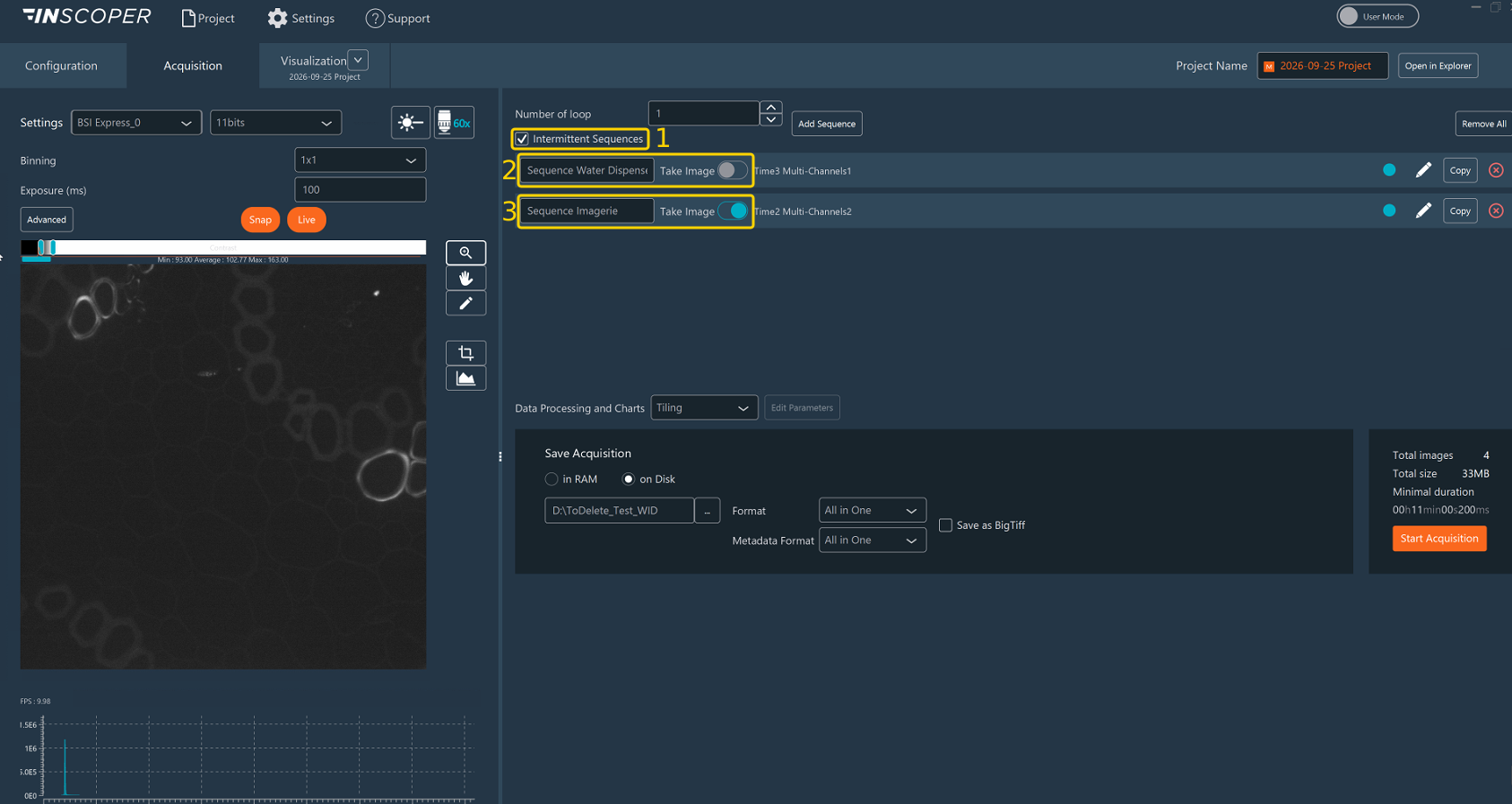
- Check Intermittent Sequences (1), so that the Water Dispenser sequence (2) runs at its own interval during the imaging sequence (3).
- Check that Take Image is disabled for the Water Dispenser sequence (2) and enabled for the imaging sequence (3).
- Click Start Acquisition.
Inscoper I.S. merges the time points of both sequences into a single timeline, ordered by time. At each time point of the Water Dispenser sequence, a Replenish runs between two time points of the imaging sequence. The acquisition waits for the end of the refresh, including the return of the objective to its focus position (see Durations). An imaging time point that falls during a refresh is acquired once the refresh is complete.
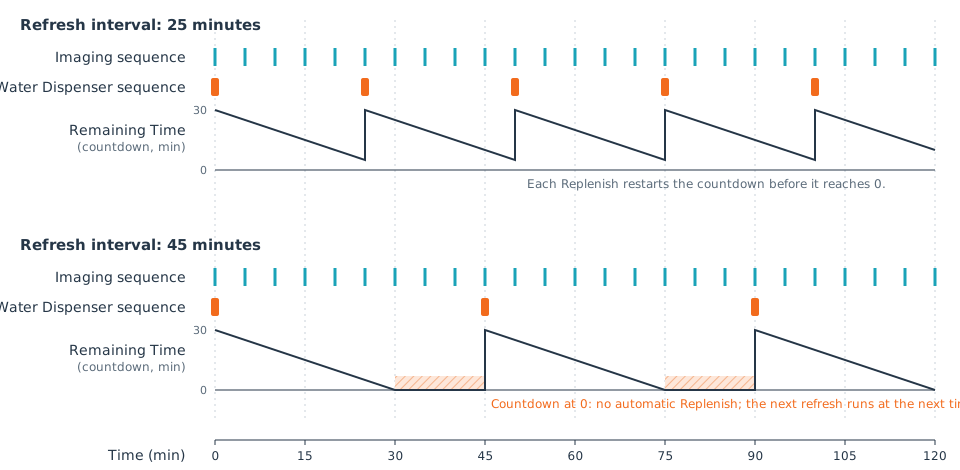
With a 25-minute interval, each refresh restarts Remaining Time before it reaches 0. With a 45-minute interval, Remaining Time stays at 0 for 15 minutes before each refresh (hatched areas), and no refresh starts during that time. The 5-minute imaging interval is an example.
Empty the circuit
Empty the circuit at the end of the session, before changing objective, and before storage:
- Stop the acquisition and every movement of the microscope.
- Switch Discharge (2) on.
- Wait until Status shows WID not initialized and Remaining Time shows
0. The Init and Replenish switches return to off, and a new Init is allowed. - Clean the objective according to the Nikon procedure approved by the laboratory.
If Inscoper I.S. is closed while the WID is still initialized, the WID is discharged automatically. Let this discharge complete before switching off the microscope.
Interaction rules and safety
- Only one WID operation may run at a time.
- Init is allowed only when the WID is not initialized.
- Replenish is allowed only after a successful Init, and may be repeated.
- Discharge is allowed only while the WID is initialized.
- Run a Discharge operation before changing objective.
- Do not change objective, move the focus or the XY stage, start an acquisition, or disconnect the USB cable during an operation.
- Do not move the objective by hand during a WID cycle.
- Keep the objective and the sample area clean and dry outside the intended water path.
If an operation fails
- Wait for the final error status, and check that the pump has stopped. Once pumping has started, the controller stops the pump automatically on failure.
- Check for leaks and for the safety of the objective.
- If the WID remains initialized, run Discharge before changing objective.
- If the state is uncertain, do not start a new Init. Inspect the diagnostic log or contact the instrument administrator.
Warning
These functions support the Nikon Ti2 water-immersion workflow. They do not replace the safety instructions of the microscope manufacturer or the fluid-handling procedure of the laboratory.
Reference
Controls
| Control | Meaning |
|---|---|
| Init | Starts a complete initialization and fills the circuit. |
| Replenish | Refreshes the water and removes air bubbles while the WID stays initialized. |
| Discharge | Removes the water and returns the WID to the not-initialized state. |
| Status | Current phase or state of the WID. |
| Remaining Time | Time, in milliseconds, until the next recommended refresh. 0 means that no countdown is running; it does not start a refresh. |
| UseWID | Virtual parameter saved in a channel. When switched on, acquiring the channel starts a refresh. |
Status values
| Displayed status | Meaning |
|---|---|
| WID not initialized | The circuit has not been filled, or has been emptied. |
| WID Initialized | The circuit is filled and ready for imaging. |
| Pumping Water | The dispenser is filling the circuit. |
| Absorbing surplus water | Excess water is being removed. |
| Removing Air bubbles | The refresh cycle is removing air from the circuit. |
| Moving to replenish position | The objective and the focus mechanism are moving to a service position. |
| Replenishing Water | A short water refresh is in progress. |
| Discharging Water | Water is being removed from the tube. |
Durations
| Operation | Approximate duration |
|---|---|
| Init | 3 minutes of pumping, plus positioning and removal of the surplus water |
| Replenish | 0.5 s of air removal, 10 s of water delivery, and 5.3 s of surplus removal, plus movements and confirmations |
| Discharge | 90 seconds, plus positioning and confirmation |
| Countdown after Init or Replenish | 1,800,000 ms (30 minutes) |
The actual durations vary with the focus position, the mechanics of the stand, the USB communication, and the timing of the state changes reported by the microscope.