Camera Trigger
The Camera Triggers section of a camera's device view lists, as radio buttons, every trigger source available to that camera. It is part of the camera's configuration view, alongside the guided-selection controls.
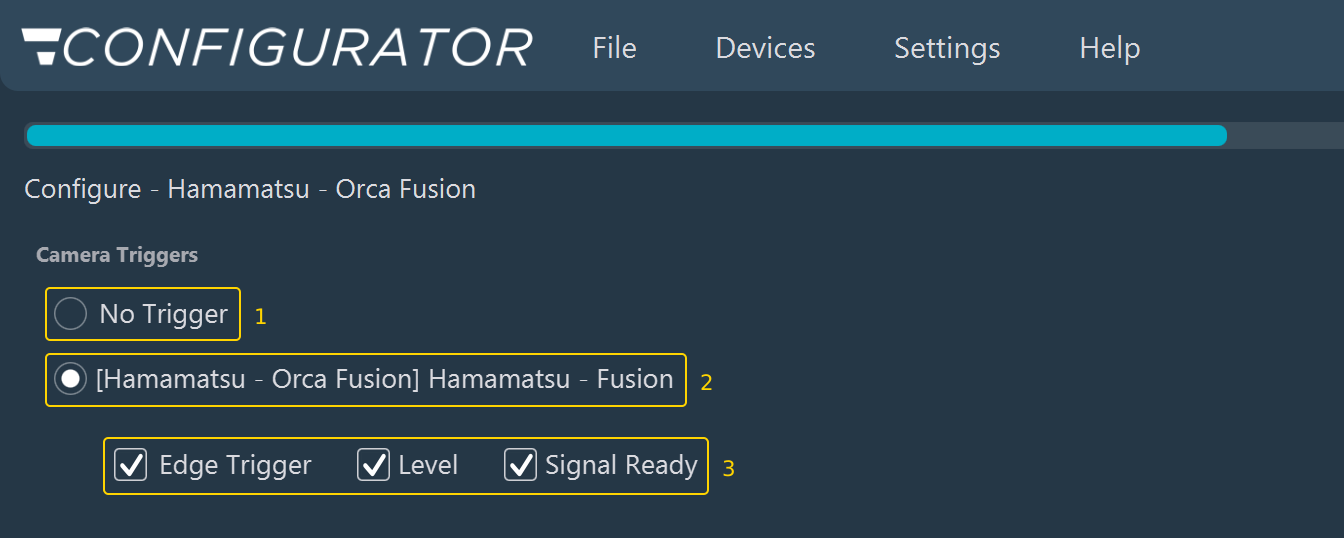
- No Trigger (1): Always offered. Select it when the camera is not triggered by another device.
- Trigger source (2): One radio button per available source, for example the Inscoper trigger device of the camera, as shown here, or a shared ConfocalNL controller when the instrument has one.
- Trigger signals (3): Displayed when an Inscoper trigger source is selected. Edge Trigger, Level, and Signal Ready are all selected by default. Clear the signals that are not wired between the camera and the Device Controller.
Selecting one of the offered options, including No Trigger, is the only mandatory action.
Note
The Advanced Camera Parameters button, available in Expert Mode on a camera group, is unrelated to this choice: it opens a read-only diagnostic view (pixel size and the trigger streams the hardware reports) rather than an editable setting. Use it to check the physical setup, not to configure the trigger.
See also: Camera ROI synchronization, Configuring a device.