Focus and Autofocus
Focus and Autofocus are not devices in their own right — they are roles that the Configurator assigns to a parameter of an imported device (most often a stage axis, but also a piezo or a dedicated autofocus module). Once a parameter carries one of these roles, its group in the Imported Hardware tree gains the fields described below.
A parameter is given the Focus role either directly from its hardware description, or through the Ambiguous role selector if the description leaves it undetermined, as for the numbered axes of a multi-axis motion controller.
Focus
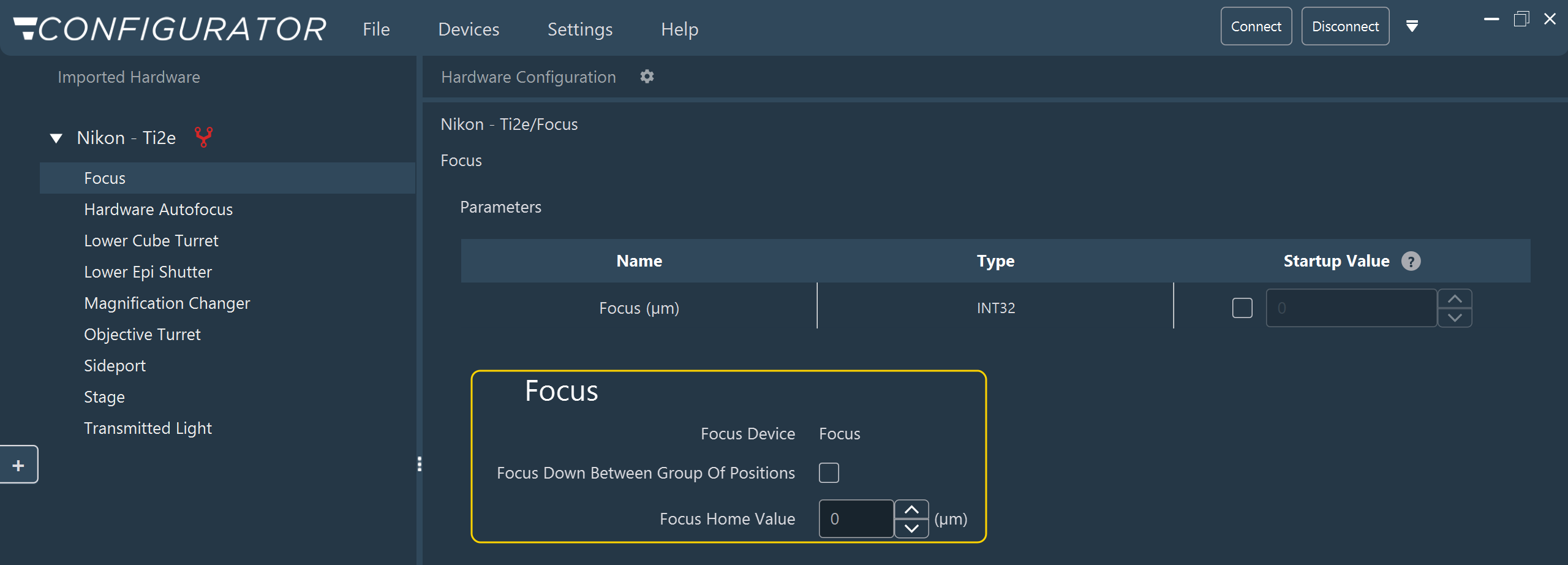
The Focus panel is always visible. It shows the parameter that carries the role (Focus Device, read-only) and two settings:
| Field | Description |
|---|---|
| Focus Down Between Group Of Positions | When checked, the focus moves to Focus Home Value at the first position of each new group of positions — typically when the stage moves to the next well of a multiwell plate — so that the objective clears the plate during the move. If an Autofocus Mode Device is assigned (see below), the move happens only while autofocus is off, or when its mode is set to switch off between groups of positions. Unchecked by default. |
| Focus Home Value | The position the focus moves to when Focus Down Between Group Of Positions applies. It has no effect when that box is unchecked. Defaults to 0, and is reset to 0 whenever a different parameter takes the Focus role. |
Autofocus
Autofocus is built from up to four independent roles, each assigned the same way as Focus:
| Role | Purpose |
|---|---|
| Autofocus Device | The switch that turns the hardware autofocus on and off. The other autofocus settings take effect only when this role is assigned. |
| Autofocus Offset Device | The autofocus offset. The imaging software sets it at the start of each position or timepoint while autofocus is on, and again after each autofocus run. |
| Autofocus Mode Device | The operating mode, which determines when the imaging software switches autofocus off during an acquisition (between timepoints, between positions, between groups of positions, or never). |
| Focus Offset Device | The difference between the focus set in the position list and the focus after autofocus correction. The imaging software uses it to apply drift correction across every plane of a Z-stack. |
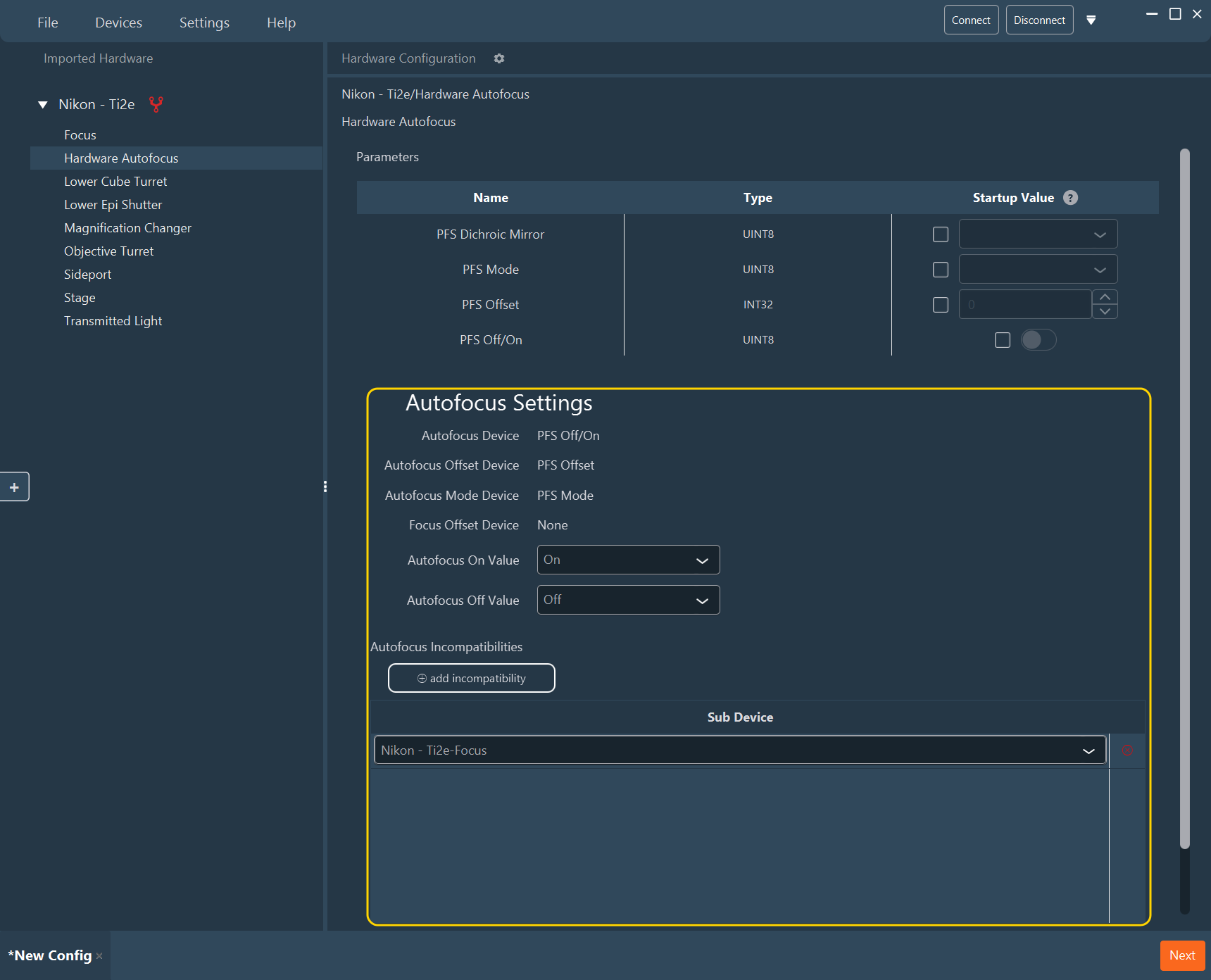
The panel lists which parameter carries each role (read-only), followed by the settings below. The whole panel is visible only in Expert Mode.
| Field | Description |
|---|---|
| Autofocus On Value, Autofocus Off Value | The values written to the Autofocus Device to switch autofocus on and off. Off defaults to 0. On defaults to 1, but is replaced by the parameter's own default value when one exists, so check it. Mandatory once the Autofocus Device role is assigned: if either value is empty when you click Next, a warning naming the parameter appears and the Configurator stays on the current stage. |
| Autofocus Incompatibilities | The focus devices that cannot run a Z-stack while hardware autofocus is on. When a Z-stack is driven by a listed device, the imaging software switches autofocus off for the stack and moves that device to each plane. The table is filled automatically with every parameter that carries the Focus role. |
Note
The Configurator also stores the Autofocus Mode values (defaults 1 = off between timepoints, 2 = off between positions, 3 = off between groups of positions, 4 = always on) and the Focus Offset Home Value (the value the focus offset is reset to at the start of each position or timepoint, pre-filled from the parameter's default value, otherwise 0). These values are not editable in the panel; they must match what the Autofocus Mode Device and Focus Offset Device expect.
Warning
The Incompatibilities table is rebuilt from the configuration whenever a device group is opened or a parameter is added or removed. A Focus parameter you delete from the table reappears, and any entry that does not carry the Focus role is dropped.
See also: Configuring a device, Handling Ambiguous Devices, Validation.